Features
MarkdownAI chat
AI chat is the product surface for AppAssistant: a dedicated /ai page, a global FAB drawer, streaming replies, conversation pin/truncate/bulk delete, and short-lived file attachments. The whole /ai/* authenticated group requires can-use-ai.
Related
Agent & tool model: AI assistant model. Imports, sync, webhook: AI imports & sync. Env/provider keys: AI configuration. HTTP: AI API & webhooks.
Team chat is separate
Human-to-human threads (item + DM hub at /chat) are documented in Chat (hub & items). They use Echo, not SSE.
Access
| Item | Detail |
|---|---|
| Permission | can-use-ai (PermissionEnum::CanUseAi) |
| Routes | routes/ai.php — middleware auth, verified, permission:can-use-ai |
| Page controller | App\Http\Controllers\Ai\AiPageController |
| Frontend page | resources/js/pages/ai/index.tsx |
| FAB | resources/js/components/ai/ai-fab.tsx in app-sidebar-layout |
AI page
| Route | Name | Behavior |
|---|---|---|
GET /ai | ai.index | Conversation list (25, pinned first) + optional selection |
GET /ai/{conversation} | ai.show | Same page with selected conversation (UUID) |
GET /ai/status | ai.status | AiStatusController — cached local provider /models probe |
Props include normalized messages (content, tools, attachments). Empty assistant tool turns get AiToolTurnSummary.
FAB
- Exported as
AiFab, mounted in the app sidebar layout. - Shown only when the user has
can-use-ai. - Hidden on
/airoutes. - Drawer: status, presets, attachments, SSE chat via
streamAiChat→POST /ai/chat.
Ask AI
List pages (users, groups, files, collections, items, activity logs) expose Ask AI via AskAiButton (resources/js/components/ai/ask-ai-button.tsx):
| Behavior | Detail |
|---|---|
| Permission | Shown only when can-use-ai |
| Modes | icon (row) or labeled (bulk toolbar) |
| Action | Opens the FAB composer with a seeded prompt (openAiWithPrompt in resources/js/lib/ai-open.ts) |
| Send | Never auto-sends — the user reviews/edits and submits |
Bulk selection can seed multi-entity prompts (see tests/Browser/AiContextBulkBrowserTest.php).
Conversations
Controller: App\Http\Controllers\Ai\AiConversationController.
Models use laravel/ai conversation tables (agent_conversations / agent_conversation_messages via config/ai.php).
| Action | Route | Behavior |
|---|---|---|
| Index | GET /ai/conversations | List owned conversations |
| Store | POST /ai/conversations | Create |
| Show | GET /ai/conversations/{conversation} | Detail |
| Destroy | DELETE /ai/conversations/{conversation} | Delete one |
| Pin | POST /ai/conversations/{conversation}/pin | Toggle pinned_at null ↔ now() |
| Truncate | POST /ai/conversations/{conversation}/truncate | Body from_message_id (UUID); deletes that message and all later |
| Bulk destroy | POST /ai/conversations/bulk-destroy | Body ids (1–100 UUIDs); must be owned; deletes messages + conversations |
Chat streaming
| Item | Detail |
|---|---|
| Controller | App\Http\Controllers\Ai\AiChatController (invokable) |
| Route | POST /ai/chat (ai.chat) |
| Throttle | throttle:30,1 (30 requests / minute) |
| Agent | App\Ai\Agents\AppAssistant |
| Response | SSE text/event-stream, ends with [DONE] |
Validated body:
| Field | Rules |
|---|---|
message | Required, max 20000 |
conversation_id | Optional UUID |
attachment_ids | Optional, max 5 UUIDs |
context_item_ids | Optional, max 10 item ids (1.4.0) |
context_file_ids | Optional, max 10 file ids (1.4.0) |
context_prompt_ids | Optional, max 5 saved prompt ids (1.4.0) |
Optional daily cap: config('ai.daily_prompt_limit') ← AI_DAILY_PROMPT_LIMIT (0 = off), counted from Spatie activity log_name=ai, event=ai_prompt.
Events may include { type: 'conversation', conversation_id } and { type: 'error', … }. Logging goes through App\Ai\Support\AiActivityLogger.
Since 1.4.0 the stream also carries the model's work, not only its text: reasoning_start / reasoning_delta / reasoning_end, tool_call and tool_result, citation (and provider tools such as web_search_call), plus the token usage at stream_end.
What an answer shows
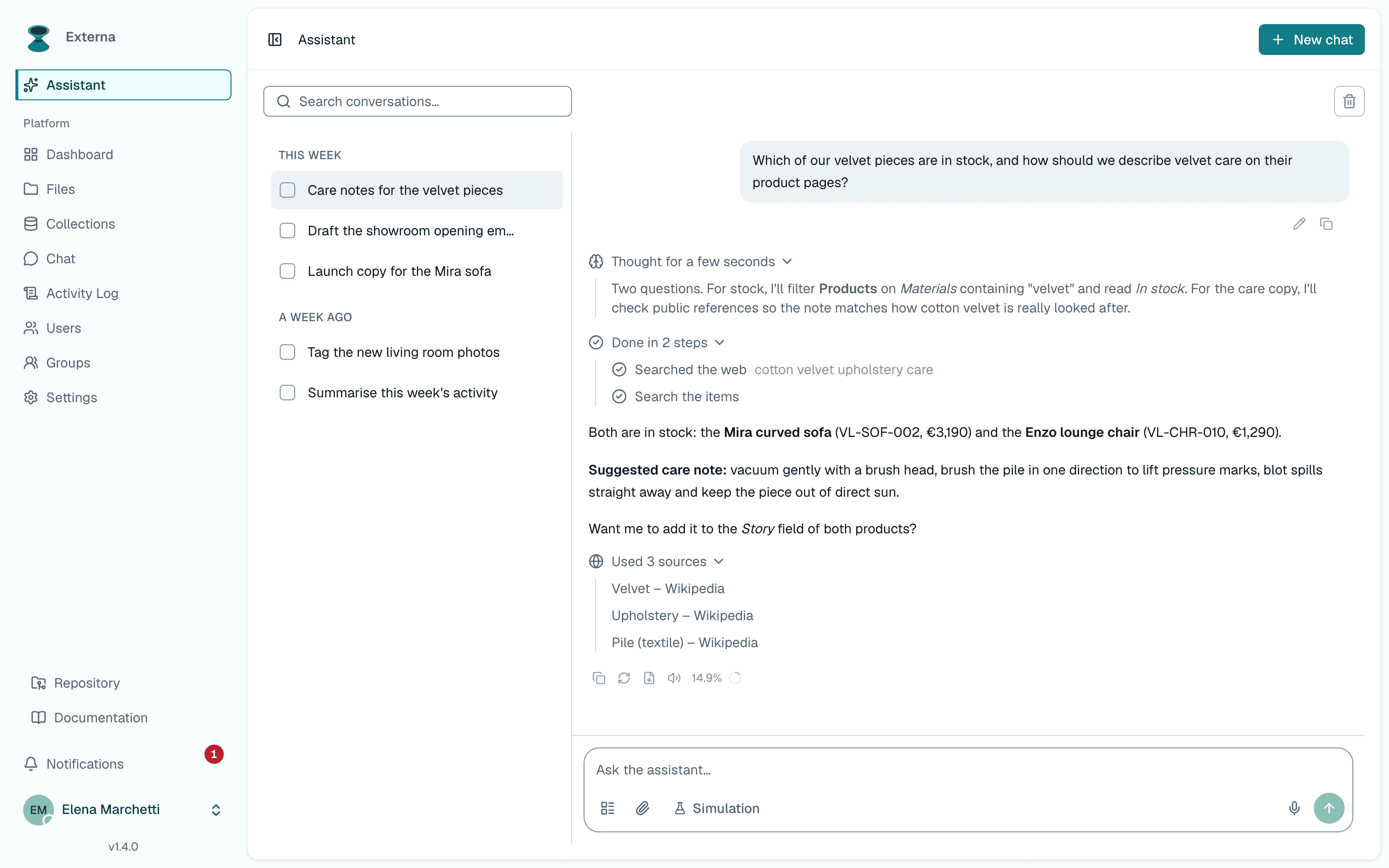
From 1.4.0 (core #565, #566, #570, #572, #615, #619, #621) every Assistant answer shows how it was produced, in the order the model produced it:
| Part | What you see |
|---|---|
| Reasoning | Thinking… while the model reasons, open so you can follow it; when it finishes it closes to Thought for N seconds ("Thought for a few seconds" after a reload). Open or close it yourself and it stays that way. |
| Tool calls | Each call as one line with a sentence ("List collections", "Searched the web") and the record it works on, never its JSON. The icon shows the state: running, done, error or denied; a failed call opens to its error. Several calls in a row are grouped under Done in N steps. |
| Text | The answer itself, in Markdown, with tables and highlighted code blocks. |
| Sources | Used N sources: the pages the model cited (for example from a provider web search), as links. |
| Token usage | The tokens used by the turn against the provider's context window (*_CONTEXT_WINDOW), with input, output, reasoning and cache tokens on hover. |
Reasoning appears only when the provider returns it: set the reasoning effort per provider — AI configuration — Assistant provider, reasoning and context window. A write tool that needs approval pauses the answer on an approval card instead of a line: the call's sentence, Reject and Approve (red only when the call deletes data). The answer offers no follow-up suggestions until you decide; once you do, the call becomes a line and the model continues — AI tool approvals & audit.
All of it is persisted: reload the page or open the conversation later and the reasoning, every tool call with its state or error, the sources and the usage are shown again, the same way they streamed. See AI assistant model — Conversations for the stored fields.
Attachments
| Item | Detail |
|---|---|
| Controller | App\Http\Controllers\Ai\AiChatAttachmentController |
| Route | POST /ai/attachments (ai.attachments.store) |
| Throttle | throttle:30,1 |
| Model | App\Models\AiChatAttachment |
Allowed extensions: csv, txt, xlsx, pdf (MIME allowlist matches those families).
| Limit | Value |
|---|---|
| Max size | MAX_BYTES = 5 * 1024 * 1024 (5 MiB) |
| TTL | TTL_HOURS = 24 |
| Disk | local |
Cleanup: scheduled ai:cleanup-attachments daily (routes/console.php).
Context attachments
From externa-core 1.4.0 (#195), the composer's Attach button opens an Attach context picker for collection items, files, and saved prompts. The selection is sent with the next message as context_item_ids, context_file_ids, and context_prompt_ids.
| Piece | Detail |
|---|---|
| Picker search | GET /ai/context/collections, /ai/context/items, /ai/context/files (throttle:60,1) |
| Limits | 10 items, 10 files, 5 saved prompts per message (more → 422) |
| Items | Need can-show-collections, collection read and the role's item filter; field values are stripped by field rules |
| Files | Need can-show-files; only metadata (id, name, MIME, size, type) is sent, never file contents |
| Saved prompts | Their body is added as a saved-prompt block |
Access is re-checked when the message is sent, not only when the picker lists results, so access revoked in between cannot leak into the model prompt. Any id that is missing or not readable fails the whole send with 422 (One or more context items are not accessible.).
The resolved context is appended to the prompt as [AI_CONTEXT_ITEMS] / [AI_CONTEXT_FILES] / [AI_SAVED_PROMPT] blocks, and the model is told to treat them as operator-selected context.
Deleting a conversation from the /ai row menu asks for confirmation (1.4.0, core #522).
Saved prompts
Project-level reusable prompts (table ai_prompts), shared by everyone with can-use-ai.
| Method | Path | Permission | Notes |
|---|---|---|---|
GET | /ai/prompts | can-use-ai | Optional search (name / description), max 100; returns can_manage |
POST | /ai/prompts | ai.prompts.manage | name (≤120), description (≤255), body (≤20000) |
PUT | /ai/prompts/{id} | ai.prompts.manage | Same fields |
DELETE | /ai/prompts/{id} | ai.prompts.manage |
ai.prompts.manage is new in 1.4.0. externa:upgrade (via permissions:sync) grants it to the built-in admin role — Upgrade.
Write actions and approvals
From 1.4.0, write and destructive tool actions are denied by default in chat, while read actions keep working. When an operator enables a tool for writes, each write or destructive action asks for your approval in the conversation before it runs. Details: AI tool approvals & audit.
Presets
Presets are static frontend prompt templates, not backend entities.
| Item | Detail |
|---|---|
| Definition | resources/js/lib/ai-action-presets.ts |
| Types | AiActionPreset, categories comuni | dati | file | admin | avanzate |
| List | AI_ACTION_PRESETS (~25 templates: CSV/Excel/URL import, dry-run, upsert, export, PDF→schema, files, roles/users/groups, audit, async import, scheduled sync, rollback, …) |
| Filter | filterAiActionPresets() — show when anyOf is empty or the user has any listed permission |
| UI | resources/js/components/ai/ai-action-presets-drawer.tsx |
Related suggested-action chips (tool results): resources/js/lib/ai-suggested-actions.ts.
Client helpers
| Helper | Path |
|---|---|
| Stream / chat API | resources/js/lib/ai-chat.ts |
| Components | resources/js/components/ai/* |
Source map
| Concern | Location |
|---|---|
| Page | app/Http/Controllers/Ai/AiPageController.php |
| Chat | app/Http/Controllers/Ai/AiChatController.php |
| Conversations | app/Http/Controllers/Ai/AiConversationController.php |
| Attachments | app/Http/Controllers/Ai/AiChatAttachmentController.php |
| Context | app/Services/Ai/AiConversationContextService.php, AiContextSearchController.php |
| Saved prompts | app/Http/Controllers/Ai/AiPromptController.php, app/Models/AiPrompt.php |
| Routes | routes/ai.php |
| UI | resources/js/pages/ai/index.tsx, components/ai/ai-fab.tsx, ask-ai-button.tsx, lib/ai-open.ts |